
Print quality troubleshooting
Find practical guidance for identifying and resolving common print quality issues, including blurry labels, smudging, fading, streaking, ribbon wrinkling, barcode distortion, and inconsistent print output. This resource helps connect visible print symptoms to possible causes such as equipment settings, ribbon compatibility, material conditions, maintenance needs, and production workflow factors.
Understanding Print Quality Issues
Print quality issues can affect barcode readability, production efficiency, product traceability, operational consistency, and overall workflow reliability throughout industrial labeling and coding environments. Problems such as smudging, fading, wrinkling, stretching, poor contrast, or inconsistent print density are often connected to equipment setup, material compatibility, environmental conditions, or production line dynamics.
Many production teams search for print quality solutions based on the visible symptom rather than the root technical cause. Identifying the specific issue early helps reduce downtime, improve workflow consistency, and support more dependable production performance.
Why are my labels printing blurry?
Blurry labels are often caused by incorrect heat settings, excessive print speeds, incompatible ribbon and material combinations, dirty printheads, or improper print resolution. Poor product movement and unstable label stock may also contribute to distorted print output.
To improve print clarity:
- Clean the printhead regularly
- Verify ribbon and material compatibility
- Reduce print speed if necessary
- Adjust darkness and heat settings
- Inspect platen rollers for wear
- Ensure labels are feeding consistently through the printer
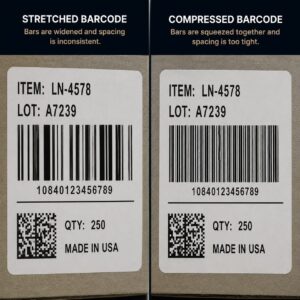
Why are my barcodes Distorted?
Barcode distortion is commonly caused by encoder synchronization issues, improper conveyor timing, inconsistent product movement, or incorrect print calibration settings. When production line speeds fluctuate or encoder signals become inconsistent, barcode dimensions may distort during printing, reducing scan reliability and operational consistency. Possible corrective actions include:
- Inspect encoder functionality
- Verify conveyor synchronization
- Confirm print speed settings
- Check label tracking and media alignment
- Recalibrate print timing settings
Why is my print ribbon wrinkling?
Ribbon wrinkling is often caused by uneven printhead pressure, improper ribbon tension, incorrect ribbon width, dirty rollers, or media alignment issues. Common causes include:
- Ribbon wider than the label stock
- Uneven pressure settings
- Misaligned media guides
- Worn platen rollers
- Excessive heat settings
- Improper spindle tension
Why are there horizontal lines or banding in my print?
Horizontal banding or missing lines are often connected to clogged printhead elements, contamination buildup, damaged printhead components, or incorrect stepping calibration. Common corrective actions include:
- Cleaning the printhead
- Running printer diagnostics
- Verifying media alignment
- Inspecting printhead condition
- Checking printer calibration settings
Why is my ink smearing or not drying properly?
Smearing or slow drying often occurs when print materials, ribbons, coatings, or curing systems are not properly matched to the production environment. Environmental humidity, excessive production speeds, glossy materials, or insufficient curing may also contribute to smearing issues.
To improve durability:
- Verify ribbon compatibility
- Use materials designed for the application environment
- Reduce print speed if necessary
- Ensure proper curing or drying conditions
- Consider protective laminates or coatings
Why are my labels fading over time?
Labels may fade when exposed to sunlight, heat, chemicals, abrasion, or moisture without proper material selection and print protection. Paper labels and direct thermal materials are generally more susceptible to fading than synthetic materials printed with thermal transfer resin ribbons.
Long-term durability often requires:
- UV-resistant materials
- Resin ribbons
- Protective laminates
- Durable synthetic label stock
- Environmental-specific adhesives
Why Are My Printed Barcodes Difficult To Scan?
Printed barcodes can become difficult to scan when print quality issues interfere with the scanner’s ability to read the code accurately. Low contrast, fading, smudging, banding, distorted bars, or inconsistent print density can all reduce barcode readability, even when the barcode format and placement are correct.
In industrial production environments, printed barcode issues may be caused by incorrect heat or darkness settings, worn printheads, ribbon and material mismatch, media movement, conveyor timing, contamination, or inconsistent label feeding. Identifying the visible print symptom can help determine whether the issue is related to equipment settings, ribbon performance, label stock, maintenance, or production line conditions.
Improving barcode performance may involve:
- increasing print contrast
- adjusting heat, darkness, or print speed settings
- checking printhead condition
- cleaning the printhead and rollers
- verifying ribbon and material compatibility
- correcting media movement or label feeding issues
- addressing smudging, fading, banding, or distortion
- confirming barcode output after production changes
Environmental Factors That Affect Print Quality
Industrial production environments can affect how well printed labels remain readable over time. Heat, cold, humidity, moisture, chemicals, oils, dust, UV exposure, abrasion, and frequent handling can all contribute to print defects such as fading, smearing, poor contrast, loss of barcode readability, or worn printed information.
Environmental print quality issues are often connected to the way the print method, ribbon, ink, label material, and application conditions work together. A label that prints clearly in one setting may not remain readable if it is exposed to moisture, chemical contact, sunlight, temperature changes, or repeated handling throughout the production process.
Selecting print components around the actual operating environment helps reduce fading, smearing, and readability issues while supporting more consistent label performance over time.
To improve print durability in demanding environments, businesses may need to evaluate:
- print method and ribbon compatibility
- label material and surface coating
- resistance to moisture, chemicals, oils, or abrasion
- UV exposure or outdoor use
- temperature conditions during storage, application, or use
- drying, curing, or bonding requirements
- protective coatings, laminates, or overlaminates when needed
Preventive Maintenance Best Practices
Routine maintenance plays an important role in maintaining print consistency and reducing unplanned production interruptions. Recommended best practices include Regular printhead cleaning, roller inspections, ribbon tension checks, media alignment verification, calibration testing, and preventive equipment servicing.
Production teams should also monitor:
- print darkness,
- barcode grading,
- ribbon wear,
- label stock quality,
- and environmental conditions
Improving Print Consistency Across Production Workflows
Print quality issues are often connected to broader production conditions, not just the printer itself. Label feeding, conveyor movement, print speed, media alignment, operator setup, material compatibility, and routine maintenance can all affect how consistently labels print during day-to-day operations.
When production conditions change, print quality can change with them. A label that prints cleanly during setup may become blurry, streaked, distorted, or inconsistent once production speed increases, materials change, rollers wear, or equipment falls out of calibration.
Evaluating print quality as part of the full production workflow helps reduce recurring defects, relabeling work, downtime, and inconsistent label performance.
Improving print consistency may involve reviewing:
- label feeding and media alignment
- print speed, heat, and darkness settings
- conveyor movement or product handling consistency
- printhead, roller, and ribbon condition
- material and ribbon compatibility
- operator setup and changeover procedures
- maintenance schedules and calibration routines
print quality support
Need Help Solving Print Quality Problems?
If print defects are causing unreadable labels, barcode readability issues, production delays, or relabeling work, the Label-N-Code USA team can help evaluate the factors affecting print performance. From smudging, fading, streaking, and ribbon wrinkling to printhead condition, material compatibility, equipment settings, and workflow conditions, our team can help identify practical ways to improve print consistency in demanding industrial environments.